

Voxly Vision for Slack: Installation Guide
- Jul 15, 2019
- 3 min read
Updated: Jul 21
Last updated: 21 July 2026
Compliance checks where your team already works
Voxly Vision helps brand, marketing and compliance teams evaluate advertising assets against selected brand and responsible-marketing frameworks without leaving Slack.
Run /voxly-evaluate, upload an asset, choose the frameworks that apply, and receive a private AI-assisted compliance report in the Voxly Vision Messages tab. The report highlights compliant and non-compliant areas, explains the reasoning, and recommends what to review or change.
Installing the app authorises Voxly Vision to access the Slack information described below. You must have permission to install apps in your Slack workspace. If your organisation requires administrator approval, Slack will guide you through that request.
Voxly Vision offers a free Slack evaluation allowance. Additional usage and paid options are available through the Voxly Vision website.
How it works in Slack
Start an evaluation. Type /voxly-evaluate in Slack. Voxly Vision opens an evaluation form.
Choose an asset. Upload the image, MP4 video or plain-text asset you want to review. The app processes only the file you deliberately submit through the form.
Select frameworks. Choose one or more compliance frameworks available to your Voxly Vision workspace.
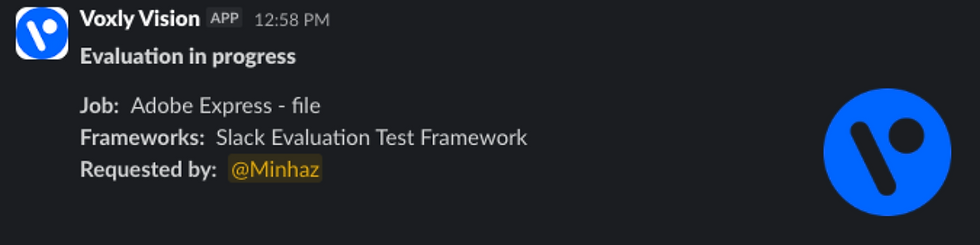
Submit. Voxly Vision sends an immediate private progress message while the evaluation runs.
Review the result. The same private message is updated with the overall result and a framework-by-framework report, including explanations and recommended actions.
Type /voxly-help at any time, or send Voxly Vision a direct message, to see usage guidance.
Important AI notice:
Voxly Vision uses generative AI. AI-generated classifications, explanations and recommendations can be incomplete, inaccurate or inappropriate. They are decision-support only and must be reviewed by a qualified person before use. Do not rely on Voxly Vision alone for legal, regulatory or other consequential decisions.
What to expect after installation
After Slack confirms the installation:
Voxly Vision securely connects the Slack workspace to a Voxly Vision workspace.
The installing member’s Slack name and email are used to link an existing Voxly Vision account or provision an account for them.
Other workspace members are linked or provisioned when they first run an evaluation.
Results are sent to the requesting member in the app’s private Messages tab; the app does not post evaluation results to a public channel by default.
To get started immediately:
Return to Slack.
Type /voxly-help to see the available commands.
Type /voxly-evaluate and submit a test asset that does not contain confidential or personal data.
Screenshots
The production /voxly-evaluate command and open modal, with realistic but non-confidential sample data.

The private “Evaluation in progress” message in the Voxly Vision Messages tab.
A completed result with the overall classification, framework summary and an opened detailed report.

Permissions and data access
Voxly Vision asks only for the Slack permissions used by the current app features:
Permission | How Voxly Vision uses it |
Add slash commands | Provides /voxly-evaluate and /voxly-help |
Send messages as Voxly Vision | Sends usage help, processing updates, errors and private evaluation results |
View files | Downloads the specific file a member selects and submits in the evaluation modal |
Start and read direct messages with the app | Opens the app’s private Messages conversation, receives new human-authored direct messages and responds with usage guidance |
View member names and email addresses | Links or provisions the correct Voxly Vision account and attributes each evaluation to the member who requested it |
The app does not request public-channel history, private-channel history or group-direct-message history, and it does not automatically join channels.
Learn more in the Voxly Vision for Slack Privacy Notice.
Pricing
Members can use Voxly Vision in Slack with a free evaluation allowance. Customers who need additional credits or broader Voxly Vision functionality can obtain them through the Voxly Vision website. Purchases are not made inside Slack.
Removing Voxly Vision
A Slack workspace owner or administrator can remove Voxly Vision from Slack’s app-management settings. Removing the app revokes its Slack access. See the Voxly Vision for Slack Privacy Notice for retention, deletion and data-request information.
Need help?
Visit Voxly Vision for Slack Support or email support@voxlydigital.com. No Voxly Vision account is required to contact support.
We aim to respond within two business days.
By installing or using the app, you acknowledge the Voxly Vision for Slack Privacy Notice and any applicable service terms agreed by your organisation.


